Guide · General
Cloud Storage Cost Comparison by Usage Level in 2026
By the FruitPunch research deskUpdated November 18, 202613 min read
In short
This cloud storage cost comparison covers annual prices by usage level, plus transfer, retrieval and exit charges that change the bill.
The advice that circulates most widely about cloud storage is simple. Buy the plan with the lowest price per gigabyte. Follow it and the bill often lands higher than the buyer expected, because stored capacity is only one line on a cloud invoice and, on metered services, it's frequently not the biggest one.
A cloud storage cost comparison that stops at the monthly price measures one thing, how much space costs. It leaves out what the provider charges when a file is opened, a backup is restored, a photo library is downloaded or an account moves to a rival.
This guide prices the same job at three usage levels. Light personal storage covers documents, email and a few photos, moderate use covers phone backups and a photo library, and heavy use covers a large media archive. Add the charges that arrive outside storage, and the annual total changes shape.
Table of Contents
- Why the Headline Storage Price Misleads
- Annual Cost by Usage Level for Consumer Plans
- Flat, Metered and Tiered Pricing Models Compared
- Transfer, Retrieval and Request Charges That Add Up
- How the Bill Changes for Three Usage Patterns
- Exit Costs and Privacy Terms to Check Before Committing
- Choose the Plan That Fits Your Total Cost
Why the Headline Storage Price Misleads
A low monthly price doesn't guarantee a low bill. Major providers split their charges into storage, requests, retrieval, data transfer, replication and related management features. Amazon Web Services' S3 pricing documentation identifies these as distinct cost components and states that customers pay according to usage, with no minimum charge, as the AWS S3 pricing page records. Google Cloud likewise lists retrieval fees separately from operation and network charges, so the effective cost of keeping data rises when files are frequently accessed or moved.
Transfer direction matters just as much. AWS lists data transferred into S3 as free in the standard, non-accelerated case, while data transferred out can carry a charge, according to AWS's S3 pricing details. Two services advertising similar storage rates can therefore produce very different bills, because one customer reads constantly and the other mostly stores. The write-heavy account pays close to the sticker price, and the read-heavy account pays for storage plus every retrieval and gigabyte that leaves.
Consumer plans hide a second trap in the capacity itself. A plan that looks inexpensive may hold a fraction of what a larger tier holds, so the number worth comparing is price per usable terabyte per year, not price per month. FruitPunch's 2026 cloud storage ranking compares 10 products, scoring each on quality, ease of use and value.
The rule that survives every pricing page: compare the annual bill for your own access pattern, not the monthly rate for capacity you may never fill.
Both traps have the same shape: the advertised figure prices a quiet account, while the bill reflects how much data moves, how often files are opened and how much of the purchased space gets used.
Annual Cost by Usage Level for Consumer Plans
Google One is the clearest published example of tiered consumer pricing, and its three entry points map onto the usage levels used here.
| Usage level | Typical storage need | Google One plan | Annual cost |
|---|---|---|---|
| Light: documents, email and a few photos | Up to 15 GB | Free allowance on any Google account | $0 |
| Moderate: phone backups and a photo library | About 100 GB | Basic, 100 GB at $1.99 per month | $23.88 |
| Heavy: large photo and video archive | About 5 TB | AI Pro, 5 TB at $19.99 per month | $239.88 |
Every Google account gets up to 15 GB at no charge, the Basic plan provides 100 GB for $1.99 per month, and the 5 TB Google AI Pro plan is listed at $19.99 per month, according to Google One's plan page.
What the per-terabyte figures show
Convert a monthly price to an annual one by multiplying by 12. Basic works out at $23.88 a year for 0.1 TB, which is about $238.80 per terabyte. AI Pro comes to $239.88 a year for 5 TB, or roughly $48 per terabyte.
The larger tier costs about a fifth as much per unit of space. That's only a saving if the space gets filled. A household that stores 150 GB on the 5 TB plan pays for capacity it will never touch, and the cheap-looking per-terabyte rate is an illusion of arithmetic.
Why the shared allowance matters
Google One storage is shared across Gmail, Google Drive and Google Photos, so the advertised capacity isn't a file-storage allowance on its own. A mailbox holding years of attachments and a phone that syncs every photo both draw from the same 100 GB. Users who treat the plan as a dedicated drive often hit the ceiling sooner than they planned.
Plans between 100 GB and 5 TB aren't priced here, and they should be read off the seller's page rather than inferred. Prices in this comparison are copied word for word from the seller, with the date FruitPunch checked them.
For a provider-by-provider view of how Google's tiers line up against alternatives, the Google Drive review sets out the plans and what each one covers.
Buy the tier, not the discount: match capacity to what you actually store, then test that choice against the restore and transfer costs before paying for a year.
Flat, Metered and Tiered Pricing Models Compared
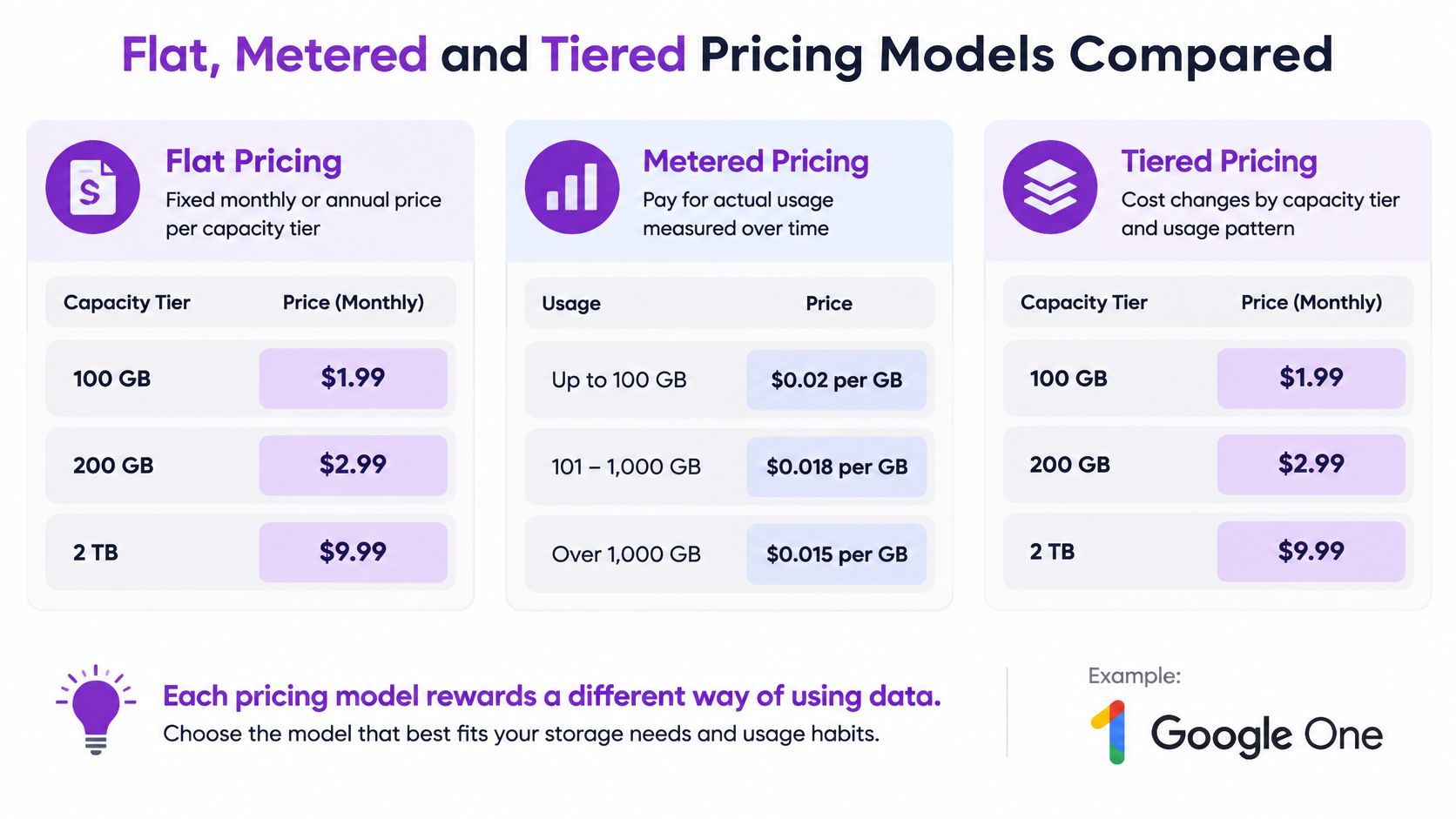
Three billing logics sit behind every cloud storage price. Flat plans charge for capacity, metered services charge for use, and tiered services charge for how often the data is touched. Each rewards a different way of using data, which is why a plan that suits one household can be the wrong buy for the next.
The chart below sets out what each model measures.
Flat plans charge for capacity
Google One is the type specimen. A fixed monthly or annual price buys a capacity tier that is shared across the services drawing on the same account. The cost driver is tier size, so the buyer's real decision is which tier to hold open, not how much of it gets used in any given week. A flat plan is a bet that usage stays steady.
Metered storage charges for access
Amazon S3 bills the data kept plus the operations run against it, and the total follows usage rather than a reserved capacity. The cost driver is the access pattern. That makes metered pricing a poor fit for anyone who can't predict how often files will be read or downloaded, because the bill scales with activity rather than with space.
Tiered storage charges for frequency
Azure Blob Storage prices capacity by access tier. Hot, Cool, Cold and Archive are aimed at progressively lower access frequency, and the service meters operations, data transfer and data retrieval separately, as Microsoft's Blob Storage pricing page documents. Moving data from Cool to Hot can trigger both read-operation and retrieval-per-gigabyte charges.
Feature meters stack on top of that. The same page identifies geo-redundancy, index data, change feed, SFTP, inventory and query acceleration as additional possible charges, so a feature-rich deployment can cost far more than raw capacity suggests. Google Cloud Storage follows the same billing shape, charging for operations and certain transfers on top of the storage rate.
The media underneath these services are still mostly magnetic. Seagate's Data Age analysis, citing IDC, records hard drives accounting for more than 90% of exabytes in cloud data centers, with SSDs making up the rest.
| Pricing model | How the bill is set | Main cost driver | Best fit |
|---|---|---|---|
| Flat consumer plan, such as Google One | Fixed monthly or annual price per capacity tier | Tier size, shared across apps | Steady personal or family storage |
| Metered object storage, such as Amazon S3 | Per GB stored plus requests, retrieval, transfer and replication | Access pattern and transfer volume | Variable workloads and rarely read archives |
| Tiered object storage, such as Azure Blob Storage | Storage rate set by access tier, with operations and retrieval billed separately | How often data is read and moved between tiers | Backups and archives with known access frequency |
One question decides which model fits: how often will this data be read or moved? A flat plan suits steady, predictable use, while metered and tiered models reward data that sits idle and penalize data read often. The per-gigabyte figure advertised on any of these plans describes only the storage line, which is why two services with identical capacity prices can produce very different bills for the same files. FruitPunch scores compare documented features and published prices, not hands-on testing, so the figures are worth confirming on each provider's page.
For a spoken overview of how the three models differ, the video sits below.
Transfer, Retrieval and Request Charges That Add Up
Charges outside storage decide the bill for data-heavy workloads. The rates below come from published examples.
| Charge | Published rate or example | What it means for the bill |
|---|---|---|
| Data transfer out, AWS example | $0.09 per GB | Moving 1 TB is estimated at $92.16 |
| S3 request charges, same example | $0.12 for the example job | Small next to transfer in a large move |
| Inter-region transfer, Oregon to N. Virginia | $0.02 per GB | Moving data between regions adds cost within one provider |
| Internet egress, typical range | $0.087 to $0.12 per GB | Downloads and provider switches pay this range |
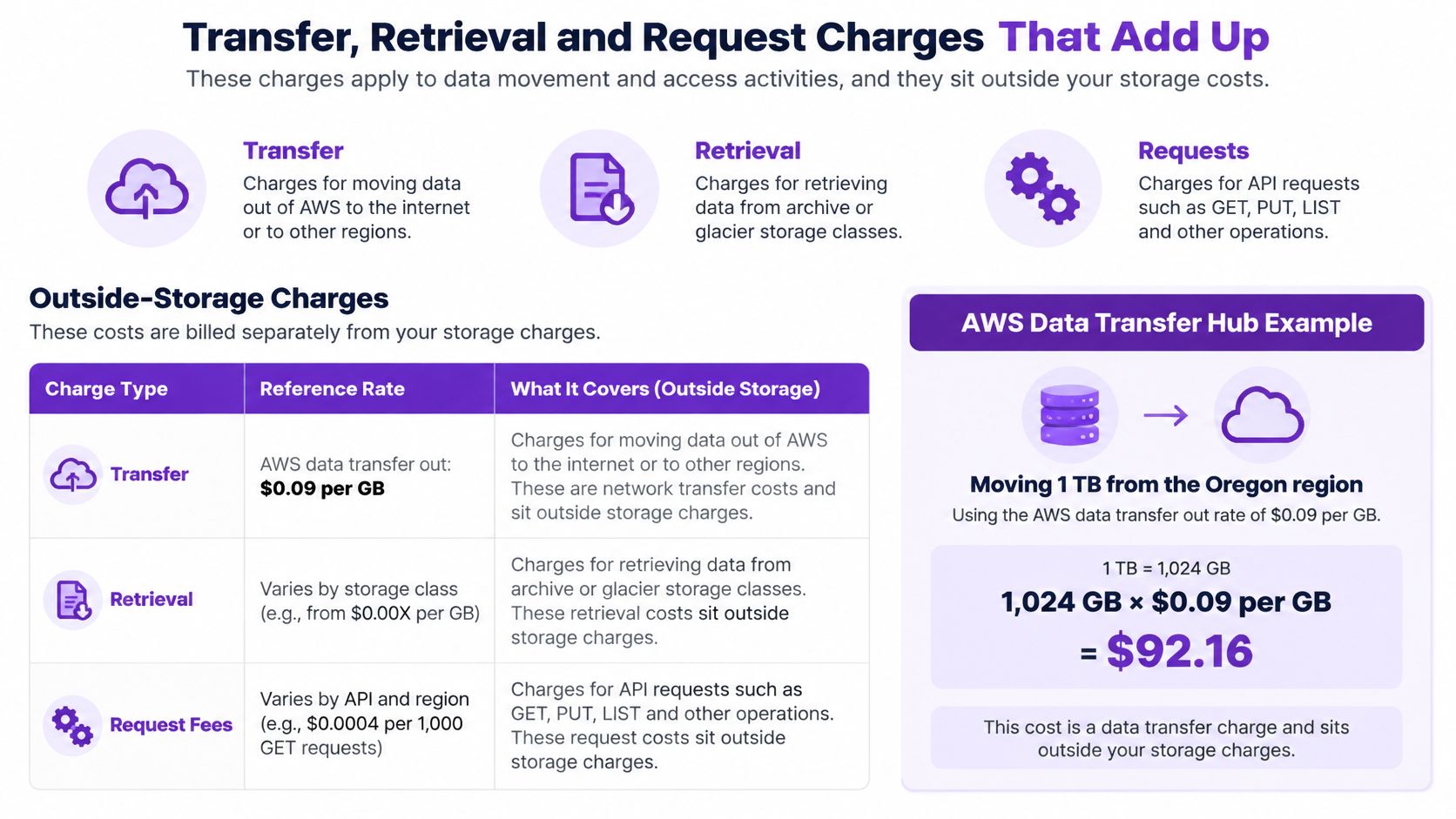
AWS's Data Transfer Hub cost example estimates that moving 1 TB of files from the Oregon Region to Beijing carries a data-transfer-out charge of $92.16 at $0.09 per GB, while S3 request charges for the same job come to $0.12. Network movement dwarfs requests in a large migration, and the storage component is not what makes that job expensive.
The third row catches people who never leave a provider. AWS lists $0.02 per GB for inter-region transfer from US West (Oregon) to US East (N. Virginia). Moving data between regions inside one account is still a billable event.
The chart below shows how these outside-storage charges stack against the storage line.
Across major providers, internet egress commonly falls around $0.087 to $0.12 per GB, and cold tiers can add retrieval and early-deletion fees on top. That produces a contrarian result worth stating plainly. The service with the cheapest headline storage price can be the more expensive choice for anyone who restores backups, edits a large media library or switches providers.
Three questions to ask before signing
- Does the quoted price cover downloads? A storage rate that excludes egress tells you nothing about the cost of getting data back out.
- Does the data cross regions? Inter-region movement is billed even when the provider stays the same, so check where replicas and backups sit.
- Is there an egress allowance, and on what terms? An allowance that expires, excludes bulk restores or applies only to some regions is not the same as free transfer.
The working rule: a bill that includes transfers rises with how often data is read or moved, not only with how much is stored.
How the Bill Changes for Three Usage Patterns
The same provider can be cheap for one household and expensive for another, because four patterns drive almost all of the variance.
| Usage pattern | Main cost driver | Model that usually costs less | Watch for |
|---|---|---|---|
| Light personal archive, rarely opened | Stored capacity | Flat plan or cold storage tier | Early-deletion and retrieval fees on cold tiers |
| Active photo and video library | Frequent reads and downloads | Flat plan with enough capacity | Download limits and sync transfer |
| Backup restore after a failure | Retrieval and egress | Provider with free or low egress under stated conditions | One-off restore cost that is large next to a year of storage |
| Moving to another provider | Egress and transfer | Source provider with the lowest exit charge | Large datasets that make one-time egress the dominant cost |
Storage that mostly sits still
A light personal archive is opened a few times a month at most, so stored capacity drives the bill. A flat plan or a cold tier fits the workload. The trap is the cold tier's own rules. Retrieval charges and minimum-retention periods can turn a cheap archive into a costly one the moment a user wants a file back early.
Libraries that get opened often
An active photo and video library is read, synced and downloaded constantly. Per-gigabyte billing punishes that pattern, so a flat plan with enough capacity usually wins. Check the download limits and sync behaviour before assuming the plan behaves like a drive, because a provider that throttles sustained transfers makes a large library painful to keep.
The month something breaks
Restoring after a failure is a one-off event, and it's where budgets collapse. A single restore of a terabyte is billed at the egress rate, and that charge can dwarf a year of storage fees. Providers with egress allowances or zero-egress policies can make a comparable transfer free under stated conditions, so read the conditions rather than the headline.
The move itself
Migration is the fourth pattern and it behaves differently. Egress is paid once, but on a large dataset it becomes the dominant line in the whole comparison. A provider that looks 20 percent dearer on storage can be cheaper overall if the exit is clean, and the reverse is just as true.
Estimate the bad month, not the average month. One restore can account for a large share of the year's cost, and averages hide it.
For most households the restore scenario decides which plan is safe to buy. For businesses, the monthly read pattern usually decides, because it repeats.
Exit Costs and Privacy Terms to Check Before Committing
Price tables treat a gigabyte as identical across providers. Buyers are also purchasing different levels of transparency, portability and control, and almost nothing measures it.
A 2025 Deloitte connected-consumer survey found that only 20% of respondents considered technology providers "very clear" about what data they collect or how it is used, and only 20% said controlling collected data was "very easy," as Deloitte's connected consumer research reports. That gap between what a price table scores and what a customer experiences is the part worth pricing in.
The useful question isn't which provider is cheapest. It's what the premium buys and how difficult leaving would be.
The exit checklist
- Export format and metadata: confirm whether timestamps, album structure and sharing settings survive the export, or whether files arrive flattened.
- Archive size and link expiry: Google Takeout splits exports into archives with size limits and expiring download links, which matters when a migration takes days.
- Batch and transfer limits: some services cap how much can be pulled in a single session, so a large library takes longer than expected to move.
- Encryption and key custody: check whether the provider holds the keys, because client-side encryption changes what support can recover.
- Account recovery rules: a plan that can't be recovered after a lost device is expensive in a way the price page never shows.
- Country differences: privacy commitments can vary by region, so read the terms that apply where the account is billed.
Test the export path on a small folder before the account holds years of data. Record the provider's export page and the date it was checked, so a later change is visible rather than discovered mid-migration.
The trade-off is easy to state. A cheaper plan with a hard exit can cost more over time than a dearer plan with clean portability. The Proton Drive review is a useful reference point for comparing plans on terms that go beyond capacity.
Choose the Plan That Fits Your Total Cost
Buy the lowest total annual cost that meets your restore needs and offers a clean export. That's the whole decision rule, and the work is in collecting the numbers behind it.
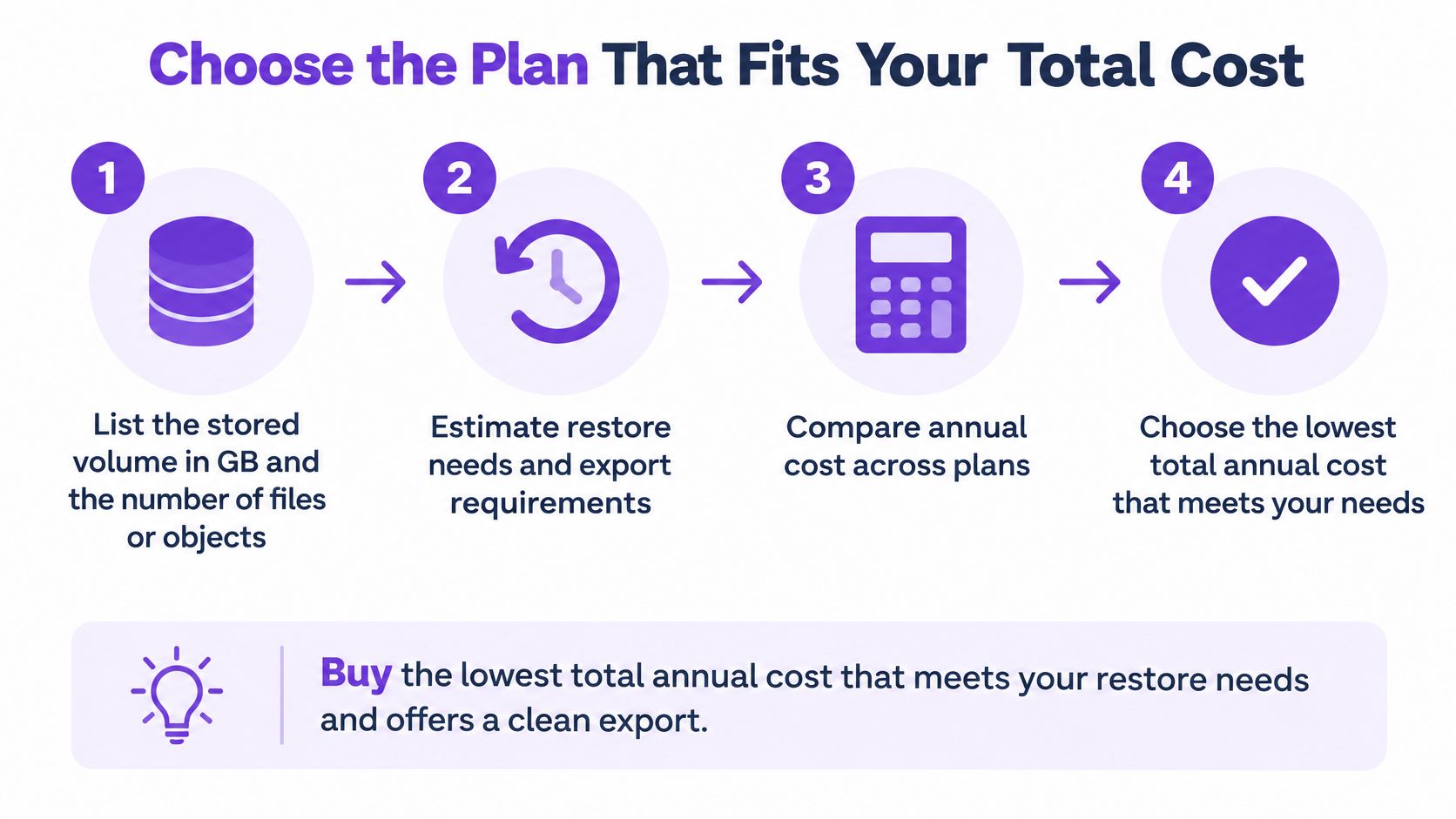
- List the stored volume in GB and the number of files or objects. Small objects amplify operation costs, so file count belongs next to total size.
- Estimate a typical month's reads and a bad month's restore volume. The bad month is the one that sets your exposure.
- Price storage for each option from the seller's current page. Note the date, because a rate checked last year is a guess.
- Add transfer, retrieval and request charges using the bad-month figure. An apparently cheap plan can lose its advantage.
- Add minimums, early-deletion fees and any listed add-on features. Cold tiers and feature meters both live here.
- Add the exit cost, meaning export limits and the time needed to migrate. Time is a real cost when a migration runs for days.
- Compare total annual cost across the three scenarios. One number per scenario beats a single average that matches neither.
- Recheck the seller page before buying. Prices change, so check the seller page before you buy.
The verdict depends on the situation, and it usually isn't close. For steady personal storage, where capacity grows slowly and files are opened now and then, a flat plan wins because it caps the bill. For data that is written once and rarely read, metered or tiered storage costs less, provided the tier's retrieval and deletion rules are understood. For anything you expect to restore or move, the provider with the lowest egress charge wins even at a higher storage rate, because the restore is the event that gets budgeted badly.
A cheap per-gigabyte rate is a price, not a bill. The bill is storage plus requests plus retrieval plus transfer plus exit, across twelve months.
The pCloud review covers that provider's plans and published prices if you want a second option to model against Google's tiers. Run the arithmetic on your own volumes before committing to an annual term, and treat every quoted rate as a snapshot.
FruitPunch publishes independent cloud storage comparisons that price plans by capacity, check the seller's page and put the figures side by side for readers who'd rather see the arithmetic than a slogan. If you want the storage tiers, the published prices and the terms in one place before you choose, start with the FruitPunch cloud storage coverage and compare plans on annual cost rather than the monthly headline.
Spotted an error in this guide? Email editorial@fruitpunch.ai